 ItsyBOT Devlog
How Event Book proves what's built
event-booktesting
Event Book now answers four questions about every part of itself: does the logic do what the plan says, does the screen show it, can a person actually reach it, and does anyone use it. Each answer comes from a different kind of check, and this week they started to line up into one chain.
Jocelyn asked for this one: “I need stuff explained. Everything from build book to usage to scenario testing to component testing and then usage testing.” So here it is, one link at a time, with one small button followed all the way through.
The build book
Most books in Event Book are plans: someone draws the events, commands and views by hand and writes the scenarios. A build book is the other kind. Nobody draws it. The tests write it.
Every time Event Book deploys, its CI runs the Given/When/Then tests with an export switched on. Each scenario comes out with the events it started from, the command it ran, and the events it really recorded (or, for a view, what the view really said). A small script saves that, and another posts it to Jocelyn’s library as the next edition of one book, “eventpad · built”.
Each command becomes a slice that changes state, and each read model a slice that shows state, with its scenarios underneath. Every slice also gets a “Code: file:line” line pointing at the function the test ran. Older editions stay on the shelf, so you can open last Tuesday’s build and compare.
And it isn’t only Event Book. Every itsybit app writes its build book the same way when it deploys: 23 of them have one on the shelf now, from barrio and Wishbook to Secret Santa, Count me in and the shared host’s own modules, most of them updated this week. Event Book is just the one we follow through here, because it’s the one where all the newer checks below landed first.
Usage
A build book says what the code does. It doesn’t say whether anyone does it. So every night the app’s real usage goes in too: how often each event happened in the last 30 days.
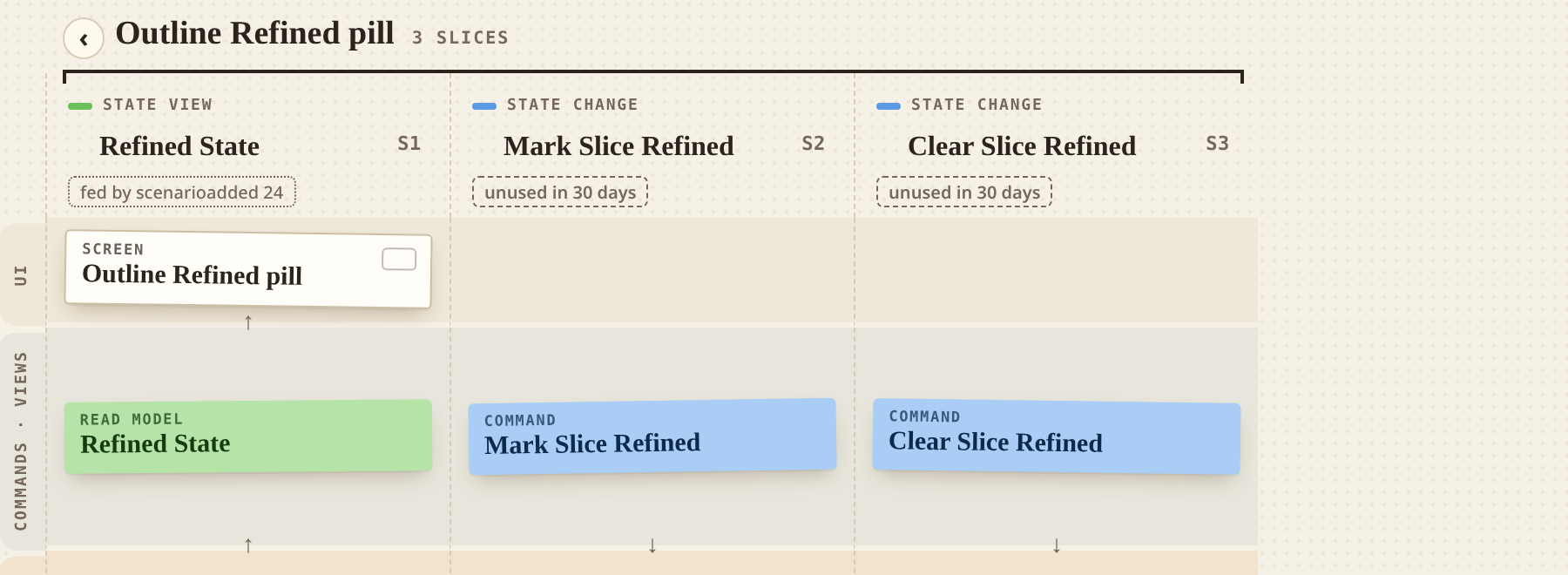
The slices then wear a badge. “40 in 30d.” “Unused in 30 days.” A view says what feeds it: “fed by Add Scenario 24”. A 📈 on the book’s spine means the build book has usage in it.
Scenario tests
These are the Given/When/Then tests we’ve written for every slice since October: given these events, when this command, then these events. Or for a view: given these events, then the view says this.
They run Event Book’s real code in Node with no browser, about 690 of them in six seconds. They prove the logic. They say nothing about the screen.
Component tests (new this week)
Here’s why we needed them. The Outline’s Refined pill had a passing scenario test: given a refined slice, the Refined State view says refined. Fine. But the screen never read Refined State. It got its data from one big view that served everything, so the test proved a view the pill didn’t use.
That gap is what component tests fill. A component test starts the same way, from events. Then it reads the view, hands the view to the app’s own drawing function (the same one the real screen uses), and checks what comes out: the label, whether the button is there.
A second kind asks a component what a tap means, runs that command, and checks the events it recorded. So now there’s proof that the screen part draws what its view says, and that its button starts the right command. Still no browser: the drawing functions turn a view into HTML, and that’s all the test needs.
Used by
Even a perfectly tested component is no use if no screen shows it. “Used by” checks that by reading the code: it starts at a function and follows its callers up until it reaches a screen.
“Draws” means a screen’s render calls it. “Taps” means a click on that screen ends up there: a listener, a button, a sheet that the screen opens, the book menu. Every exported scenario now carries that path, and the build book shows it under the Code line, like “Used by: Outline (draws: refinedPill › renderDetails › renderRow › renderOutline)”. Or, in red: “⚠ no screen reaches it.”
A component test now fails when no screen reaches its component. One limit, honestly: Used by reads code, so it proves a screen can reach something, not that it rendered on a real visit. That’s still a job for a browser.
How they connect
Put together it’s one chain, and each link proves the next one is standing on something real:
- A scenario proves a view says the right thing.
- A component test proves a component draws that view, and that its button runs the right command.
- Used by proves a screen shows that component.
- Usage shows whether people actually use it.
One button, all the way through
The Outline has a small pill on each slice: “Mark refined”, or once a slice is refined, “Refined: tap to take it back”. Refined is the product owner’s tick, so it matters that it works.
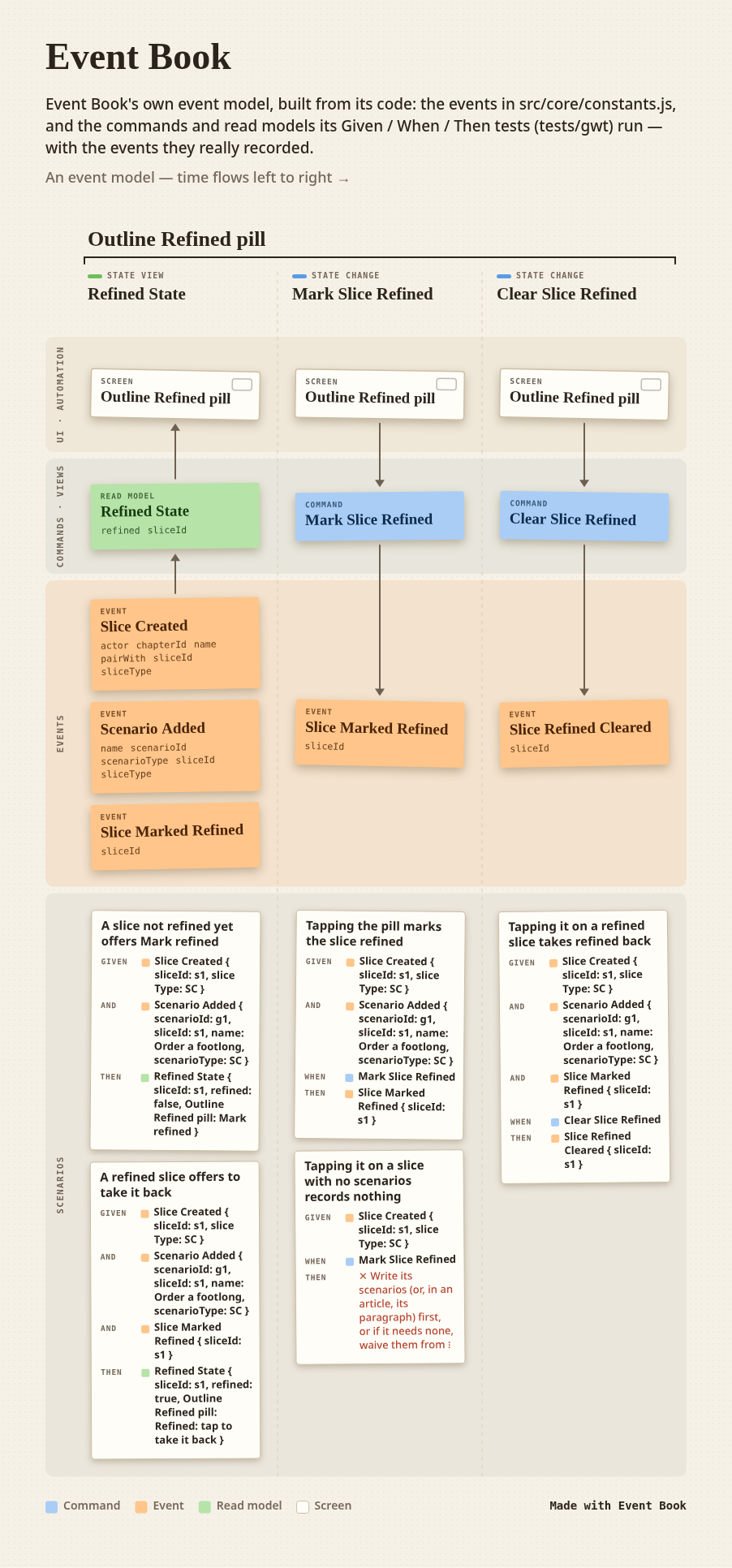
- Scenarios. “A refined slice offers to take it back”: given a slice was created, got a scenario and was marked refined, the Refined State view says refined. “A refined slice described since is not refined”: edit it afterwards and it’s not refined any more.
- Component.
refinedPill(view)draws the pill. The test checks the label for both cases. Tapping it runs Mark Slice Refined (or Clear Slice Refined), and the test checks the event that’s recorded. - Used by. “Outline (draws: refinedPill › renderDetails › renderRow › renderOutline)”, and for the tap “Outline (taps: refinedPillTap › handleClick)”.
- Usage. Refined State is fed by 24 Scenario Added events. Mark and Clear Slice Refined: unused in the last 30 days. That’s exactly the kind of thing a build book should say out loud.
We also made sure each test can fail. Swapping the board’s Ready and Done chips turned the chip tests red. Making the tap mark instead of clear turned the tap test red. Drawing the pill inline instead of calling refinedPill turned the component test red with “no screen shows refinedPill”.
What it found straight away
The first real catch: “Mark Slices Built” had tests, passing ones, on a function called markSlicesBuilt. No screen calls it any more. The Compare screen’s Confirm button uses confirmSlicesDone instead. So the build book had been saying “tested” about code the app doesn’t run. Used by put a red “⚠ no screen reaches it” on it.
Across the whole app, 193 of the 232 slices with app code reach a screen. The other 39 are now a list to go through.
Where it stands
Each build book edition will carry a Coverage line, so the numbers show up next to the work:
- 38 of 80 views have scenarios.
- 3 of 185 screen components have component tests.
- 136 of 170 tested functions reach a screen.
- Screens still read the book directly 241 times, and replay it 121 times, across 31 files.
That last line is the next job, and it’s the real fix for the pill story above. A screen should get its data from one view made for it, not dig through the book or a big shared view, because then the view a test proves is the view the screen shows. Used by already helps here: a tested view that no screen calls gets “⚠ no screen reaches it”, which is exactly how the pill’s case looks.
So we’re giving each screen its own view, starting with the Outline, the worst file (25 direct reads and 20 replays). That first one is in review now: the Outline drawing from one tested view, outlineScreen, with 17 scenarios and 6 component tests, taking the count from 241 to 229. Then the Board, the Library, the slice page and the rest. A Coverage line on each build book edition (also in review) will show the numbers move.
What the chain still can’t see
Two holes are left, and we’d rather name them than pretend.
First, the pill story again: a test can prove a view the screen doesn’t use. One view per screen fixes that, and a tested view that no screen calls already shows up red.
Second, Jocelyn’s worry: “it could make a component but then still hardcode everything on the page.” An agent could write a nicely tested refinedPill, then have the Outline draw its own copy of the pill by hand. The component test passes, Used by can still say Outline, and a browser would happily find a pill. Nothing in the chain today would notice.
The answer is a browser pass per screen that checks who owns what’s on it: every visible button, link and pill must belong to a component, and each component must show what the screen’s own view says. A hand-drawn copy has no owner and drifts from the view, so it goes red.
Next time
That’s the plan, and it starts with an honest count. Event Book has about 300 browser tests, and many of them check rules a scenario could prove in milliseconds. So first we sort them into rules, flows and drawing, then move the rules into scenarios, give each screen its own view, and add the ownership pass, with “Seen on: Outline ✓” next to “Used by” in the build book.
The follow-up post will be the before and after: how many direct reads are left, how many browser tests became scenarios, how much faster the suite got, and what the ownership pass caught the first time it ran.